SELCO branches and contact centers will be closed Monday, September 7 in observance of Labor Day. Account access and support will still be available through digital banking and our virtual phone assistant.

Phishing alert: SELCO impersonators are calling about fraudulent transactions and requesting account information. As a reminder, SELCO will never contact you requesting sensitive information or instruct you to perform transactions. If you receive one of these calls, please hang up immediately.

Enroll With Zelle®

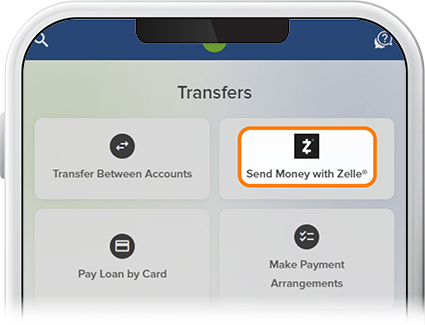
  1. Step 1

    Tap Transfer, then select Send Money with Zelle®

    Enroll With Zelle® Step 1
  2. Step 2

    Tap Get Started, then review and accept the Terms and Conditions. 
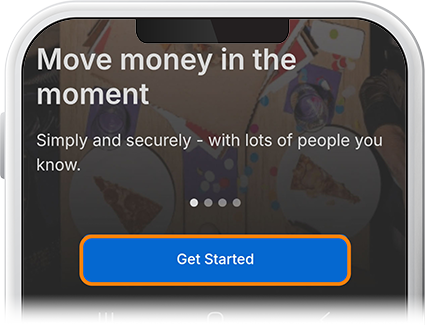
    Enroll With Zelle® Step 2
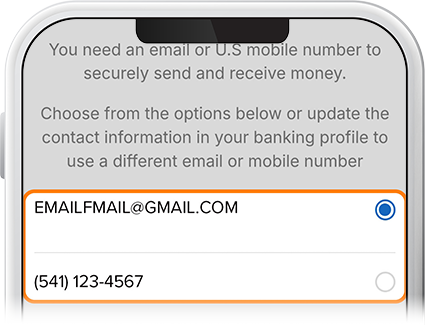
  3. Step 3

    Choose either the email or phone number from your digital banking profile to enroll and select Continue. A 6-digit verification code will be sent to your email/phone. Enter the code and tap Verify

    Enroll With Zelle® Step 3
  4. Step 4

    Select a SELCO savings or checking account from which you want to send and receive money and tap Continue. A congratulations message will be displayed. You’re ready to send or request money. Check out this How-To to learn how.
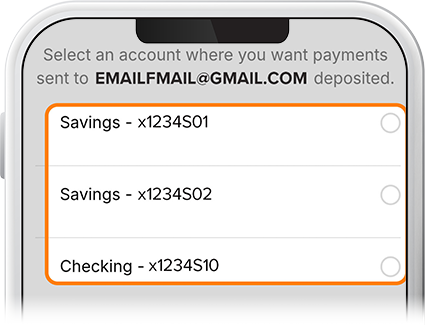
    Enroll With Zelle® Step 4