Phishing alert: We’ve received reports of SELCO impersonators calling members about fraudulent transactions. As a reminder, SELCO will never contact you requesting sensitive information, including card numbers or login credentials. If you receive one of these calls, please hang up immediately.

SELCO branches and contact centers will be closed Monday, October 12 in observance of Indigenous Peoples’ Day. Account access and support will still be available through digital banking and our virtual phone assistant.

Verify Test Deposits at an External Institution

These steps will be required ONLY if you manually link an external account to your digital banking.

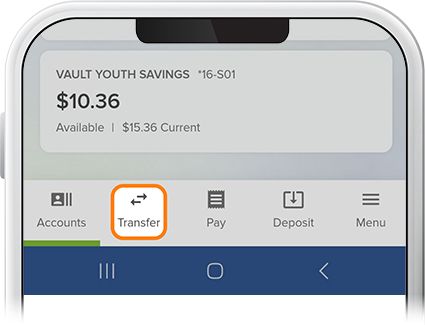
  1. Step 1

    Tap Transfer, then Manage External Accounts. 
    Verify Test Deposits at External Institution step 2
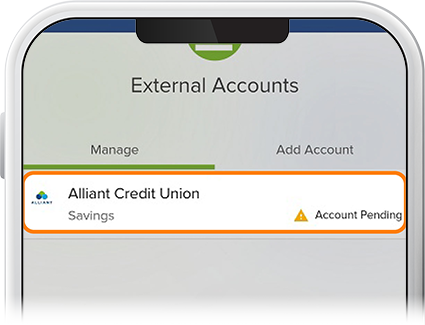
  2. Step 2

    Under Manage, tap your external institution. 
    Verify Test Deposits at External Institution with the SELCO community credit union app step 2
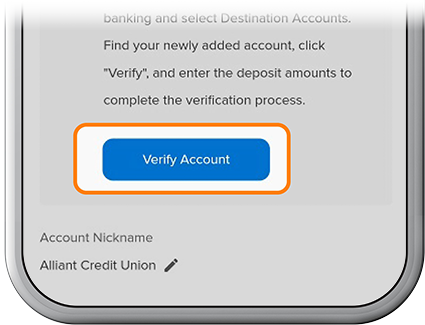
  3. Step 3

    Review the Trial Deposit Verification, then tap Verify. 
    Verify Test Deposits at External Institution with the SELCO community credit union app step 3
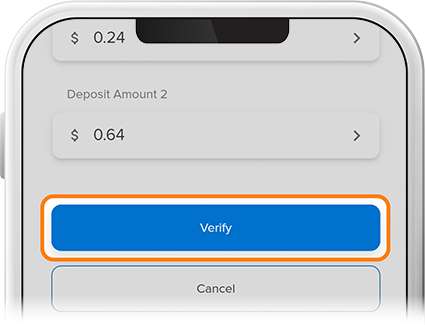
  4. Step 4

    Enter the test deposit amounts, then tap Verify. You’re all set!
    Verify Test Deposits at External Institution with the SELCO community credit union app step 4