Phishing alert: We’ve received reports of impersonators calling and texting members to initiate wire transfers or cash withdrawals. As a reminder, SELCO will never contact you to request wire or cash transactions. If you receive one of these messages, please delete it or hang up immediately.

Verify Test Deposits at an External Institution

These steps will be required ONLY if you manually link an external account to your digital banking.

  1. Step 1

    Tap Transfer, then Manage External Accounts. 
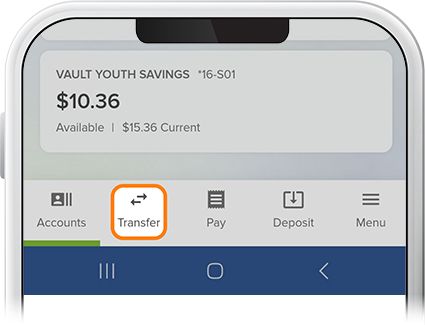
    Verify Test Deposits at External Institution step 2
  2. Step 2

    Under Manage, tap your external institution. 
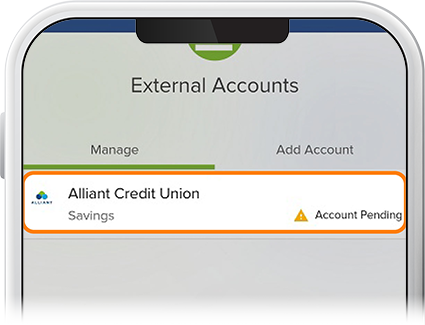
    Verify Test Deposits at External Institution with the SELCO community credit union app step 2
  3. Step 3

    Review the Trial Deposit Verification, then tap Verify. 
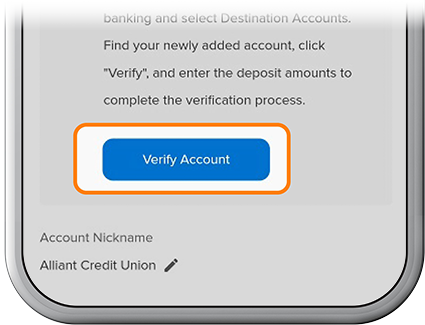
    Verify Test Deposits at External Institution with the SELCO community credit union app step 3
  4. Step 4

    Enter the test deposit amounts, then tap Verify. You’re all set!
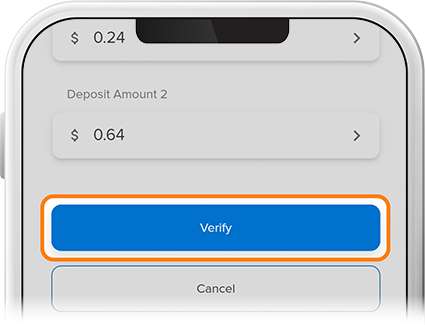
    Verify Test Deposits at External Institution with the SELCO community credit union app step 4