


You’ve probably noticed that scam emails and texts are getting harder to tell apart from legitimate messages. If it’s enough to make you question everything that hits your phone or inbox, you’re not alone.

Scammers are using artificial intelligence (AI) to breathe new life into traditional phishing methods, making them more convincing and harder to recognize. Scammers use AI to mimic writing styles and design convincing website content—including login pages—in seconds. As a result, spotting phishing scams takes even more care and attention than it used to.
So, what can we do?
First off, trust your gut. If you aren’t expecting a message, don’t be so quick to click a link (whose sole purpose may be to collect usernames, passwords, or other sensitive information).
But your gut isn’t your only resource. Try the tips below to determine the validity of links embedded in unexpected emails and texts—even when the message appears to be from a reputable source.
Checking links in emails
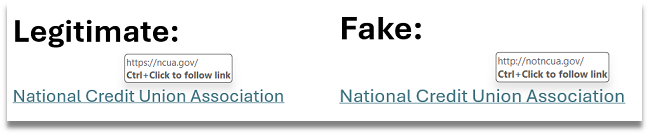
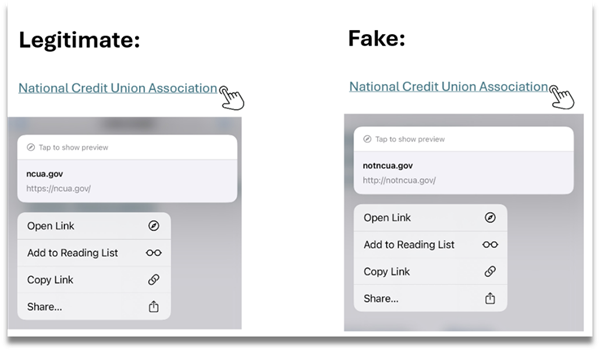
Unfortunately, it’s easy to hide where links will take you from an email. (See the example screenshots from a desktop computer and mobile device below.) Often, an email makes its way into your inbox with a hyperlink that’s displayed in a way that makes it appear to come from a credible source. (Or, it might say “click here” or “sign on.”)
Here’s how to inspect hyperlinks in emails to see where they really go:
- On a desktop computer: Hover your cursor over the hyperlink (without clicking, of course). The intended address will be displayed near the hyperlink:
- On a mobile device: Press and hold your finger on the link—being careful not to tap it—and the destination link will appear as a pop-up:
Checking links in texts
Inspecting links in a text is a little trickier. Text links can’t be masked like in emails, so you’ll need to understand the different parts of a URL (the website address) to determine if it’s legitimate or not. Let’s start by reviewing a diagram of a URL’s structure:
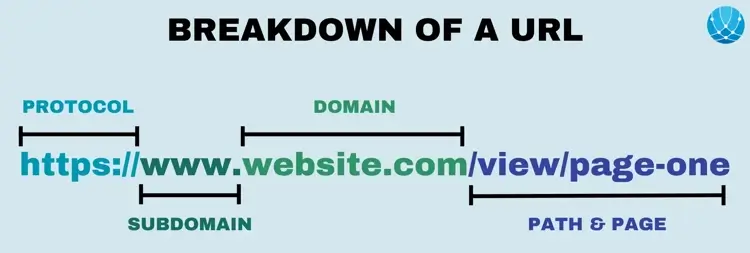
Now let’s break down SELCO’s full website address, https://www.selco.org:
- The “https://” is the “scheme” or “protocol” and lets you know if the site is secure or not. (You want to look for the “s” at the end of “http.” This stands for “secure.”)
- The subdomain is “www” (the most common subdomain).
- “selco” is the second-level domain.
- The top-level domain is “.org,” which sets it apart from the most common top-level domain, “.com.”
As you can see in this real-life smishing attempt, all the components of the link are red flags:
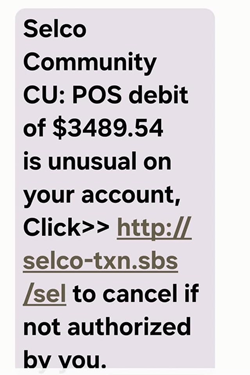
A slightly more sophisticated scammer might have used “http://www.selco.com,” but even that address has multiple red flags—the “http://” isn’t SELCO’s secure scheme, and “.com” isn’t SELCO’s top-level domain. In the following real-life example that a member fortunately flagged and contacted SELCO about, a couple components—".com" instead of ".org" and no "www" subdomain—are red flags. However, the recipient could easily be tricked by the urgency of the "NOT YOU?" message in all caps with a link to cancel the transaction.
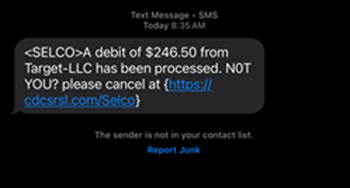
If the member had clicked on the fraudulent link, they likely would have been directed to an impersonation site that resembles selco.org—and that's where the scam would begin. They would then enter their credentials thinking they are legitimately logging in and now the fraudsters have their user name and password. Alternatively, in a scenario where someone simply replies "Yes" or "No" to verify a transaction, the fraudster will likely call them and ask for their username and a One-Time Passcode. What really happens here is the fraudster goes through the password reset process on selco.org, using the OTP to change the password and log in as the member.
In either case, if a member clicks on the link and account/password information has been provided, SELCO would work with them to change the account number and set up a new username and password for digital banking. We may also have them take their device to a specialist to be scanned for malware or other malicious software.
“Providing your username and OTP basically gives fraudsters a back door to your personal information, similar to giving out both your username and password,” said Jeriah Brown, Financial Investigator at SELCO. "That little detail may not be as well known to everyone, and they may not realize just how important it is to protect that code."
In today’s hustle and bustle, it can be tempting to respond to a text or email quickly and get on with your day. In fact, scammers rely on it. But slowing down to confirm the authenticity of hyperlinks in emails and texts will go a long way toward keeping your information safe (and saving you even more time and headache if the sender is a scammer in disguise).


